
BioEden Controls and HUD
Read the prompt bar. Recycle is not a late-game cleanup.
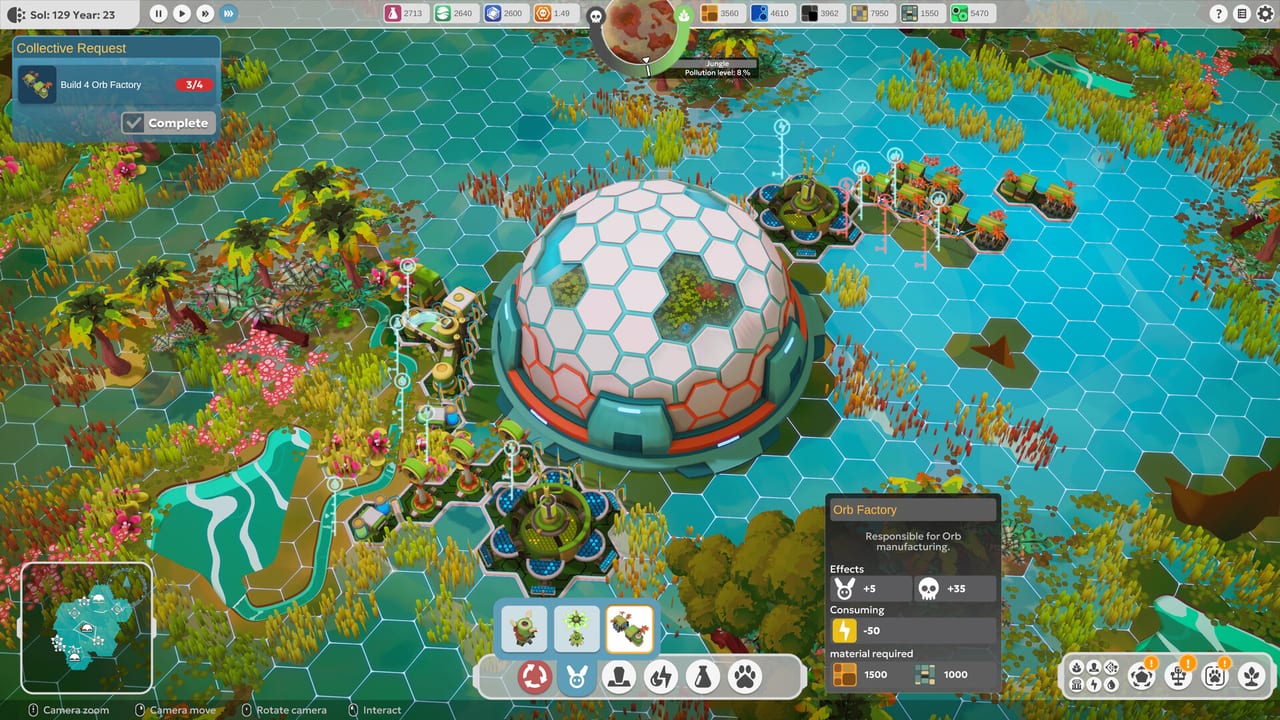
BioEden is a camera game before it is a factory game. Keepers who cannot see spare solar output stamp a second pylon. Keepers who cannot find the recycle control treat a crowded Prairie as a lost cause. This page is the HUD, not a keybind table. The prompt bar at the edge of the screen shows the current bindings for your keyboard, mouse, or controller. Do not memorize a guessed keyboard layout from a wiki; read that bar, then change it in the options if the defaults fight your hands.
Charles teaches move, rotate, zoom, and interact in the playable Steam demo. Those four actions are the whole outside loop. Inside a dome the same camera still matters: you need to see temperature tools, plant ghosts, and whether a carnivore tile sits against a herbivore. If you came here because the first hour felt floaty, go back to Getting Started after you can orbit a hex without losing the resource bar.
Camera, interact, and the prompt bar
Move the camera until the hex grid and the dome interior are both readable. Rotate when a building ghost hides behind another. Zoom out to watch pollution on the globe widget; zoom in to seat an incubator or a Fern patch. Interact confirms placements, opens stages on the incubator, and talks to panels Charles highlights.
The prompt bar updates with context. Over debris it offers salvage. Over a building it offers inspect, power, or recycle. Over a species it offers the Bestiary card. If a prompt looks empty, you are probably zoomed through the floor or focused on the skybox. Nudge the camera and look again.
Full controller support is on the Steam listing, including DualSense. Xbox-style pads work. The same prompt bar remaps to face buttons and sticks instead of keys. Gyro or adaptive-trigger flavour may appear on DualSense; treat anything extra as a bonus, not a required mechanic. Steam Cloud and achievements are listed for the full game scheduled for 3 September 2026. An SSD is required; hitching that feels like a camera bug is often storage. Check system requirements before you blame the HUD.
This is a single-player management game. There is no second cursor to wait for. Pause, rotate, and think.
Recycle, tools, and the building palette
The recycle control lives at the bottom of the HUD. Official FAQ copy is blunt: there are no fail states, you can take as long as you need, and recycling reverses placements. Recycle returns all resources spent on that building. It also cuts the footprint that was nudging pollution and Impact Level. Use it early. The demo guide is full of Keepers who learned this after a 95% Prairie. The restore the planet walkthrough is the longer version of the same button.
Next to recycle sit the inside-dome tools. Temperature and humidity tools push a dome toward a species window — Landowl’s 20–45° and 55–90% humidity, for example. Plant tools stamp native vegetation such as Fern. Water tools place watering holes and pipes that only help if the climate is already close. Animal tools open the Bestiary, the incubator, and diet bowls. Hover a tool before you commit; the ghost preview is cheaper than an undo only because recycle exists.
The building palette is the outside list: solar generators, water distributors, cables, pipes, radar, extractors, research buildings, Orb Factory, and the rest of the solarpunk kit. Hover a structure before you confirm it. The Orb Factory tooltip in the demo is a useful warning even if you are not mass-producing orbs: energy drain and a large pollution hit on the same card. That is the game telling you production is never free. Shortest cables and pipes beat decorative loops; the power and water page is the network version of that rule.
Powering a building down is not recycle. Power down if you might need the structure in ten minutes. Recycle if the globe is sick and the building is idle. Broken Arms Games’ intended play, said out loud to previewers, is to build only what the next purification or species step requires.
Resource bar and the globe widget
The resource bar along the top tracks scrap, energy, water, DNA fragments, and whatever else the current biome knowledge tree has unlocked. A green energy number with a climbing pollution slice is not success. Spend the bar on the next request, then stop.
The globe pollution widget is the score the bar cannot show. It lists pollution percentage, Impact Level, and named sites such as Jungle, Prairie, and Red Forest. Collective Requests and Active Regulations sit near it. Requests are a to-do list from the Cosmic Collective. Regulations are the rules currently in force — extra impact from certain buildings, pressure to restore rather than industrialize, or a bonus for recycling. Read both before you open the palette.
If the widget shows a crowded Prairie and a Collective Request wants four Orb Factories, the request is wrong for this hour. Recycle. Purify a lake. Come back to the request when the globe can afford it. That is not failure. BioEden will not fail you out.
Inside the dome the same honesty applies. The animal care page lists temperature, humidity, plants, diet, and predator spacing. The biome guide explains why a Tundra card in a Savannah hex needs more climate tools, not more camera spin.
When the HUD finally feels small, you are ready to play. Orbit the landing hex, read the prompt bar, recycle one unused pylon, and go back outside. Charles will still be talking. You do not have to answer him until the globe looks quieter than the palette.
Frequently Asked Questions
Quick answers to the most common questions.
What are the BioEden keyboard controls?
Do not guess. The HUD prompt bar shows the current bindings for camera move, rotate, zoom, and interact. Remap them in options if needed, then return to Getting Started.
Where is the recycle button?
At the bottom of the HUD. Recycling undoes a placement and returns all resources. Use it whenever the globe looks worse than the palette, as in restore the planet.
Does BioEden support a controller?
Yes. Full controller support, including DualSense. The same prompt bar remaps to the pad. Steam Cloud and achievements are listed for the 3 September 2026 release. Specs sit on system requirements.
What does the globe widget measure?
Pollution percentage, Impact Level, and named sites. It is the real score. If it climbs while you build, recycle and read power and water.
Why do my animal tools do nothing?
Climate first, plants second. Match temperature and humidity, then vegetation. The animal care guide lists windows such as Landowl’s Fern requirement.